The hardest part of doing payroll yourself isn’t the math — it’s counting the hours. Learn why tracking employee hours eats your time and 5 ways to get it back.

If you’re doing payroll yourself, you’ve probably assumed the hardest part is the math — the taxes, CPP, and EI. It isn’t. According to Dawit Teferi, CEO of ABMBooks and a CPA and CMA, the hardest part of doing payroll yourself is counting the hours and putting them all together. And the real cost isn’t the money. It’s the time.
What’s the Hardest Part of Doing Payroll Yourself?
The hardest part of doing payroll yourself is tracking and adding up employee hours, not calculating deductions. The CRA’s free online calculator can work out payroll taxes, but you still have to collect, total, and check every employee’s hours each pay period. Without a central time tracking system, that’s where most of your payroll time goes.
- The easy part: calculating taxes, CPP, and EI with the CRA’s calculator or payroll software
- The hard part: collecting, adding up, and checking everyone’s hours each pay period
- The fix: a central system that tracks hours and feeds them straight into payroll
Table of Contents
Isn’t Calculating Payroll Taxes the Hard Part?
Not anymore. Calculating deductions used to be the intimidating part of payroll. Today, the CRA’s Payroll Deductions Online Calculator calculates federal, provincial, and territorial payroll deductions for you. Payroll software does the same thing automatically on every pay run.
So when owners ask Dawit what makes doing payroll yourself so hard, his answer is always the same: “The hardest part, always for me, is counting the hours — putting it together.” The problem, as he puts it, is that “you still have to spend the time adding the hours, making sure” they’re right.
Why Does Tracking Employee Hours Take So Long?
Dawit’s example is a restaurant with a bunch of part-time employees. Everyone works different shifts, some pick up extra hours, others swap days. If those hours aren’t centralized, then every week or two you spend an exorbitant amount of time adding up the payroll — chasing paper timesheets, reading text messages, and checking totals by hand.
Here’s an illustration of how quickly that adds up. If you have 12 part-time employees and it takes 10 minutes per person to collect, total, and double-check their hours, that’s 2 hours every pay run. On a bi-weekly schedule, that’s roughly 52 hours a year — more than a full work week — spent on hours alone, before you’ve run a single paycheque.
Here is how that time scales with team size:
| Team size | Time per pay run | Time per year (bi-weekly payroll) |
|---|---|---|
| 5 employees | 50 minutes | About 22 hours |
| 12 employees | 2 hours | About 52 hours |
| 25 employees | About 4 hours | About 108 hours |
| 50 employees | About 8 hours | About 217 hours |
Missing or incorrect hours also lead to pay errors, which is why payroll accuracy matters more than most business owners think.
What Is the Real Cost of Doing Payroll Yourself?
Dawit’s bigger point is that the cost of doing payroll yourself isn’t just the money. It’s the time it costs you — and time is the one thing you can’t get back. Every hour spent adding up timesheets is an hour you’re not spending on customers, staff, or growing the business.
That’s why, in his words, “having a system” is the most important part. If you don’t have a good system for tracking hours, payroll is only going to cost you more time.
5 Ways to Save Time When Doing Payroll Yourself
- Centralize employee hours: keep every timesheet in one place instead of on paper, in texts, or across spreadsheets
- Track clock-in and clock-out times: record hours as they happen, not from memory at the end of the pay period
- Separate hour types: keep regular, overtime, vacation, sick, and holiday hours in clear categories
- Build shift schedules ahead of time: plan shifts so you know who should be working before the hours come in
- Send hours straight into payroll: avoid re-entering totals so your pay run is accurate the first time
How Does ABMBooks Handle Payroll Time Tracking?
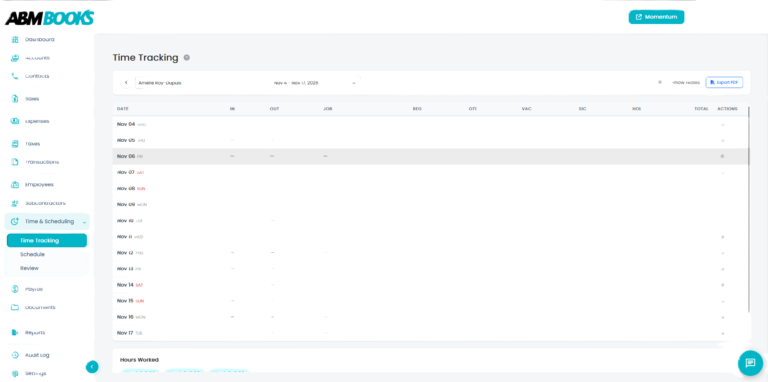
ABMBooks was built to solve exactly this problem. With ABMBooks time tracking and scheduling, you can record clock-in and clock-out times for each employee, build shift schedules by day, week, or month, and capture regular, overtime, vacation, sick, and holiday hours in separate columns. Your team can even accept or decline assigned shifts.
Most importantly, tracked hours flow straight into your pay run through ABMBooks payroll, so there’s no re-entry. If you’re comparing options, see How to Choose the Best Payroll Software in Canada.
Frequently Asked Questions
What is the hardest part of doing payroll yourself?
For most small businesses, the hardest part is tracking and adding up employee hours every pay period. Calculating CPP, EI, and income tax is easier, because the CRA’s online calculator or payroll software can do it. Collecting, totalling, and checking hours by hand is what takes the most time.
Can I use the CRA payroll calculator to do payroll myself?
Yes. The CRA’s Payroll Deductions Online Calculator works out federal, provincial (except Quebec), and territorial payroll deductions for free. However, it only calculates deductions from the pay you enter, so you still need accurate hours for each employee before you can use it.
How long does it take to do payroll yourself?
It depends on your team size and how you track hours. As a rough guide, if collecting and checking each employee’s hours takes 10 minutes, a team of 12 adds about 2 hours to every pay run, or roughly 52 hours a year on bi-weekly payroll.
How do I track employee hours for payroll?
Use a time tracking system that records clock-in and clock-out times, keeps regular, overtime, vacation, sick, and holiday hours separate, and sends totals straight into payroll. ABMBooks combines time tracking, shift scheduling, and payroll in one platform, so hours never need to be re-entered.
Is it worth doing payroll yourself as a small business?
It can be for very small teams, but count the time it takes, not just the money you save. If adding up hours is eating into your week, a system that tracks hours automatically usually pays for itself in time saved and fewer pay errors.
Do I need payroll software if I only have part-time employees?
Part-time teams often benefit most. Part-time staff usually work changing shifts and varying hours, which makes manual tracking slow and error-prone. Payroll software with built-in time tracking keeps every shift in one place and turns tracked hours into accurate pay runs automatically.
In Dawit’s Words
“The hardest part, always for me, is counting the hours — putting it together. In Canada, the CRA has a payroll calculator. The problem is you still have to spend the time adding the hours, making sure. If you don’t have a good system for that, it’s only going to cost you more time. … It’s very important to remember: it’s not necessarily the money of doing payroll, it’s the time it costs you.”
— Dawit Teferi, CEO, CPA, CMA, ABMBooks
About the expert: Dawit Teferi is the CEO of ABMBooks, a CPA and CMA, and leads a Canadian tax and accounting practice. He built ABMBooks to solve the payroll and bookkeeping problems he saw small business clients face every day. Learn more about ABMBooks.
Doing payroll yourself doesn’t have to eat your week. Put your team’s hours in one system, let them flow straight into payroll, and get your time back.