Adding up hours is the most painful part of payroll. See how ABMBooks employee time tracking for payroll works: approve the hours, approve the payroll, done.
Employee time tracking for payroll is where most small businesses lose the most time. When ABMBooks looked at how customers actually run payroll, one problem stood out above the rest: adding up hours. According to Dawit Teferi, CEO of ABMBooks and a CPA and CMA, that discovery shaped how ABMBooks payroll works today — so you can approve the hours, approve the payroll, and you’re done.
How Does ABMBooks Help Businesses Track Employee Hours?
ABMBooks builds employee time tracking for payroll directly into its timesheets. Employees log their hours, you approve them, and the approved hours flow straight into your payroll run. ABMBooks then calculates the payroll and has it ready for your final approval, so you can run payroll in one or two touches instead of adding up hours by hand.
- Touch 1: approve your employees’ hours
- Automatic: ABMBooks calculates the payroll from approved hours
- Touch 2: approve the final payroll
Table of Contents
Why Is Adding Up Hours the Hardest Part of Payroll?
Because it’s manual, repetitive, and easy to get wrong. When ABMBooks studied customer experiences, the team discovered that adding hours is the most painful part of making sure payroll is done properly. In a growing business with more employees, collecting and totalling hours every pay period becomes a bigger problem each time you hire.
As Dawit explains, the team realized that for the ABMBooks payroll solution to be perfect, it had to have employee time tracking for payroll built in. For a closer look at how much time manual hour tracking costs, see What’s the Hardest Part of Doing Payroll Yourself?
How Does Payroll Work in Just 2 Touches?
With ABMBooks, payroll takes two approvals. Your employees enter their hours, you handle timesheet approval, ABMBooks calculates pay and deductions automatically, and you approve payroll one final time. Here’s the step-by-step process:
How to run payroll in ABMBooks in two touches, from employee timesheets to final payroll approval.
Employees log their hours
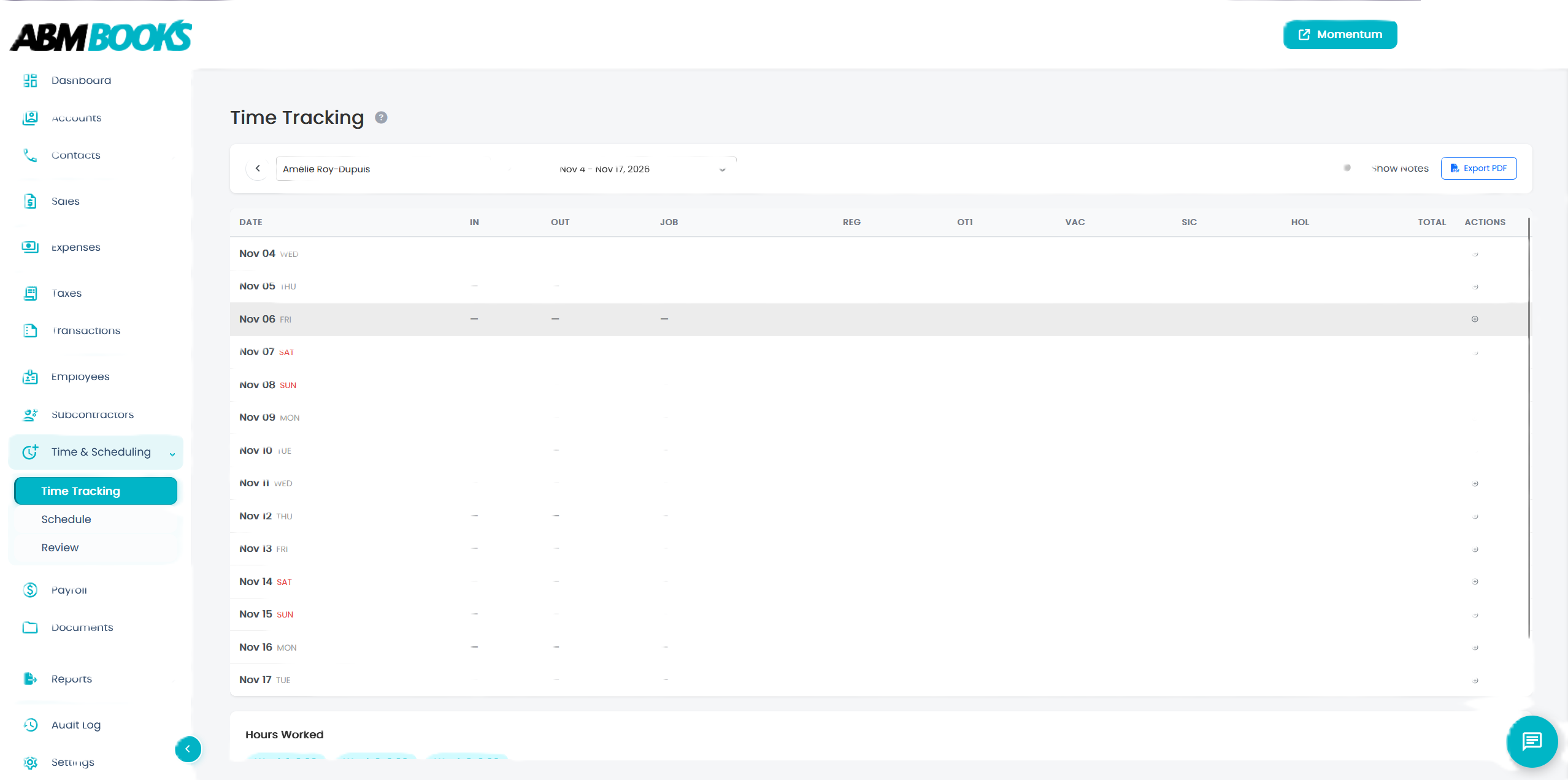
Each employee records their clock-in and clock-out times in ABMBooks timesheets, with regular, overtime, vacation, sick, and holiday hours kept in separate columns.
You approve the hours (touch 1)
Review each employee’s timesheet for the pay period and approve it. Any missing or incorrect hours are caught here, before they reach a paycheque.
ABMBooks calculates the payroll
Approved hours flow straight into your pay run. ABMBooks calculates gross pay and deductions such as income tax, CPP, and EI, and prepares pay stubs automatically.
You approve the final payroll (touch 2)
Open your payroll, review the totals, and approve the final version. Your pay run is complete in one or two touches.
What Does ABMBooks Employee Time Tracking for Payroll Include?
Employee time tracking for payroll in ABMBooks covers the details that usually make hours hard to manage. According to the ABMBooks time tracking and scheduling features, you can:
- Track hours by employee: record clock-in and clock-out times for each employee across every pay period
- Sort every hour type: capture regular, overtime, vacation, sick, and holiday hours in separate columns
- Build shift schedules: plan shifts and breaks by day, week, or month
- Use shift approvals: employees can accept or decline assigned shifts
- Send hours straight into payroll: tracked hours flow into your pay run with no re-entry
Which ABMBooks Plans Include Timesheets?
Timesheets are included starting with the Basic plan, and timesheets with geofencing plus scheduling start with the Momentum plan. Here’s how the plans compare for employee time tracking for payroll:
| Plan | Monthly price | Employees included | Time tracking features |
|---|---|---|---|
| Dasher | $9.99/month | Up to 2 | Timesheets not listed |
| Basic | $24.99/month | Up to 5 | Timesheets (no geofencing) |
| Momentum | $49.99/month | Up to 10 | Timesheets with geofencing, scheduling |
| Advanced | $74.99/month | Up to 15 | Everything in Momentum |
| Premium | $149.99/month | Up to 20 | Everything in Advanced |
What Are the Benefits of Timesheet Approval Before Payroll?
Timesheet approval means you catch mistakes before they reach a paycheque, not after. It keeps you in control of every pay run while removing the manual work of adding up timesheets yourself.
- Fewer pay errors: incorrect or missing hours are caught at approval, before payroll runs
- No re-entry: approved hours feed payroll directly, so nothing is typed twice
- Less time per pay run: two approvals replace hours of collecting and totalling timesheets
- Clear records: hours and pay are stored together for each pay period, which helps since the CRA requires business records to be kept for at least six years
Accurate hours are the foundation of accurate pay, which is why payroll accuracy matters more than most business owners think.
Frequently Asked Questions
How does ABMBooks track employee hours?
ABMBooks handles employee time tracking for payroll with built-in timesheets. Employees record clock-in and clock-out times, hours are sorted into regular, overtime, vacation, sick, and holiday categories, and once you approve them, they flow straight into payroll. There’s no separate time tracking app and no re-entering hours.
What does “payroll in 2 touches” mean?
It means you only need to act twice to run payroll in ABMBooks. First, you approve your employees’ hours. Then ABMBooks calculates the payroll automatically, and you approve payroll in its final version. Everything in between, including totalling hours and calculating deductions, happens for you.
Why should I approve timesheets before running payroll?
Timesheet approval lets you catch missing or incorrect hours before they become pay errors. It keeps you in control of every pay run, and because approved hours go straight into payroll, you avoid the mistakes that come from adding up and re-typing hours by hand.
Which ABMBooks plans include timesheets?
Timesheets are included starting with the Basic plan at $24.99 per month, without geofencing. The Momentum plan at $49.99 per month adds timesheets with geofencing and shift scheduling. Check the ABMBooks pricing page for current plans, employee limits, and prices before you sign up.
How long should I keep employee timesheets in Canada?
Timesheets are part of your payroll records, and the CRA generally requires businesses to keep records for at least six years from the end of the tax year they relate to. Storing timesheets with your payroll in one system makes them easy to find if you ever need them.
Can employees enter their own hours in ABMBooks?
Yes. Employees log their own hours in ABMBooks timesheets, which saves you from collecting paper timesheets or text messages. You stay in control because every timesheet still needs your approval before it goes into payroll, so nothing is paid without your review.
In Dawit’s Words
“We looked at the customer experiences, and we discovered adding hours is the most painful part of making sure your payroll is done properly. So we realized that our payroll solution, to be perfect, had to have a time tracking system. … When your employees plug in their hours, those hours get approved. Once you approve, it just goes to payroll. It calculates the payroll and it comes ready for you. You just go to your payroll and approve the final version of it. So basically, you could do payroll from one or two touches.”
— Dawit Teferi, CEO, CPA, CMA, ABMBooks
About the expert: Dawit Teferi is the CEO of ABMBooks, a CPA and CMA, and leads a Canadian tax and accounting practice. He built ABMBooks to solve the payroll and bookkeeping problems he saw small business clients face every day. Learn more about ABMBooks.
Employee time tracking for payroll shouldn’t take hours. With ABMBooks, your team logs their time, you approve it, and payroll is ready in two touches.